Brain Backup
Don’t have time to read? Get the “Brain Backup” cheat sheet. Learn to filter information using Cornell & Zettelkasten to transform your writing and productivity today.
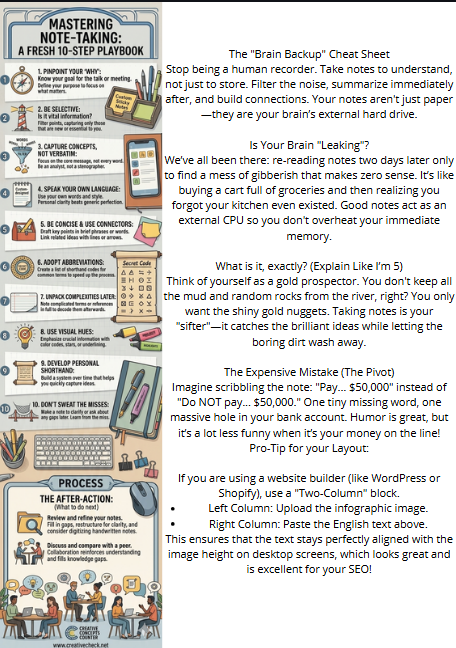
Is Your Brain Leaking? The Great Note-Taking Dilemma
We’ve all been there: sitting in a meeting or a lecture, nodding like we’re the next Einstein, only to look at our notes two days later and see a series of hieroglyphics that make zero sense. It’s like buying groceries and then realizing you forgot the kitchen existed.
Think of your brain like a high-end smartphone with a terrible battery. You can’t keep every “app” (information) running in the background, or you’ll crash before lunch. Taking notes is simply plugging in an external hard drive so your internal CPU doesn’t overheat.
What Exactly is Note-Taking (Explained for a 10-Year-Old)?
Imagine you are a gold miner. When you go into a cave, you don’t bring back all the dirt, the rocks, and the old spiderwebs, right? You only want the shiny gold nuggets.
Note-taking is your “gold pan.” It’s the tool you use to catch the important ideas while letting the boring “dirt” (the filler words and “umms”) wash away.
Wait, Can a Bad Note Actually Cost You Money?
Imagine you’re a legal assistant. Your boss tells you: “We need to settle this case, but NOT for more than $50,000.” In your messy notes, you just scribble: “Settle… $50,000.” The next day, you tell the opposing lawyer: “We agree to settle for $50,000.” You just lost your client’s leverage because you missed a three-letter word: NOT. That’s an expensive typo that might result in you having a lot of “free time” to practice your note-taking at the unemployment office.
What Do the Masters Say About It?
Professional note-taking isn’t just a student habit; it’s a science. The International Organization for Standardization (ISO) actually has standards for documentation (like ISO 15489), emphasizing that information must be “authentic, reliable, and usable.”
Experts like Sönke Ahrens, author of How to Take Smart Notes, argue that if you don’t write it down in a way that connects to what you already know, you might as well not have learned it at all. He champions the Zettelkasten method, which treats notes like a web of ideas rather than a linear list.
Which Style Should You Choose?
| Feature | The Cornell Method | The Flow Method |
| Best For | Test prep and structured learning. | Creative brainstorming and fast lectures. |
| Structure | Divided into Cues, Notes, and Summary. | Holistic maps with arrows and bubbles. |
| Effort | High (requires review). | Low (feels like doodling). |
| Vibe | The “Strict Librarian.” | The “Mad Scientist.” |
[Infographic Idea: The Survival Guide]
(Visual Description: A drawing of a hiker with a backpack labeled “Notes.” On the left path, the hiker is drowning in “Information Mud” because they tried to write everything. On the right path, the hiker is light and fast, carrying only “Gold Nuggets” of key concepts.)
Frequently Asked Questions (FAQ)
Q: Is it better to type or write notes by hand? A: Science usually tips the hat to handwriting. When you type, you tend to transcribe (type everything verbatim). When you write by hand, you’re forced to summarize because your hand is slower than a speaker’s mouth.
Q: What if I’m too lazy to review my notes? A: Then you didn’t take notes; you just made a souvenir. Even a 5-minute review session can increase your retention by over 50%.
Q: Can I use emojis in professional notes? A: Absolutely. A “⚠️” is much faster than writing “This is extremely important for the year-end audit.” Just make sure your boss doesn’t think the “💩” emoji refers to the quarterly earnings.
The Golden Rule for Your Next Meeting
Write for your future, “stupider” self. Assume that in 48 hours, you will have forgotten everything. If your notes can explain the topic to that confused future version of you, then you’ve done it right.
The “Brain-Saver” 10-Step Checklist
Phase 1: The Setup (Don’t Wing It)
- Select Your Medium: Choose your weapon (Paper = better memory; Digital = better searchability). Stick to one for the duration of the project.
- The “Header” Habit: Never start a blank page without a Date, Topic, and the “Big Question” you’re trying to answer.
- Divide Your Space: If using paper, draw a vertical line 2 inches from the left. Left side is for Cues (keywords/questions); Right side is for Content.
Phase 2: The Capture (The Gold Mining)
- The 60/40 Rule: Don’t write everything. Aim to capture 60% of the core ideas. If you’re writing 100%, you’re a stenographer, not a thinker.
- Use “Smart Shorthand”: Develop a personal code. (e.g.,
w/= with,->= leads to,?!= needs research). - Highlight the “Aha!” Moments: When a lightbulb goes off, mark it with a star ($\star$) or a box. These are your gold nuggets.
Phase 3: The Polish (The 10-Minute After-Party)
- The “Gap Fill” (Within 24hrs): Review your notes while they’re fresh. Fix that one word you scribbled that looks like a dying spider.
- Formulate the Cues: On that left-hand margin, write down the questions that your notes answer. (e.g., “Why did the 2008 crash happen?”).
- Write the “Executive Summary”: At the bottom of the page, summarize the entire session in exactly three sentences. If you can’t, you didn’t understand it yet.
- The Linkage: Connect this note to one other thing you already know. Ask: “How does this relate to [Project X]?”
Quick Pro-Tip: The “Lego” Test
“Good notes are like Legos. A single brick is useless, but if you design them to click together, you can eventually build a castle.”
The Capture Zone (Right Column)
Use this area during the live session. Keep it messy but meaningful.
- Key Point 1: [Insert main idea here]
- Evidence/Detail: [Supporting fact or data]
- ⚠️ Warning: [Potential pitfall or “Don’t forget” note]
- Key Point 2: [Insert next big shift]
- 💡 Aha! Moment: [That specific thing that finally clicked]
- [ ] Action Item: [Something you actually need to DO later]
🔍 The Cue Column (Left Margin)
Fill this out immediately after the session. These are your search terms.
- Q: [What question does the note above answer?]
- Term: [Key vocabulary or “Jargon” explained]
- Link: [[Reference to a related project or note]]
🏗️ The 3-Sentence Executive Summary
The “Too Tired to Read” section. If you only had 10 seconds, what would you need to know?
- The Core: [The most important takeaway]
- The Context: [Why this matters right now]
- The Next Step: [The very first thing to do with this info]
🛠️ Quick Markdown Shortcuts for your Apps:
- Use
[ ]to create a clickable checkbox for tasks. - Use
> [!INFO]in Obsidian to create a beautiful callout box. - Use
**Bold**for terms you’ll likely search for later.